Note
Go to the end to download the full example code.
Barchart with modified path
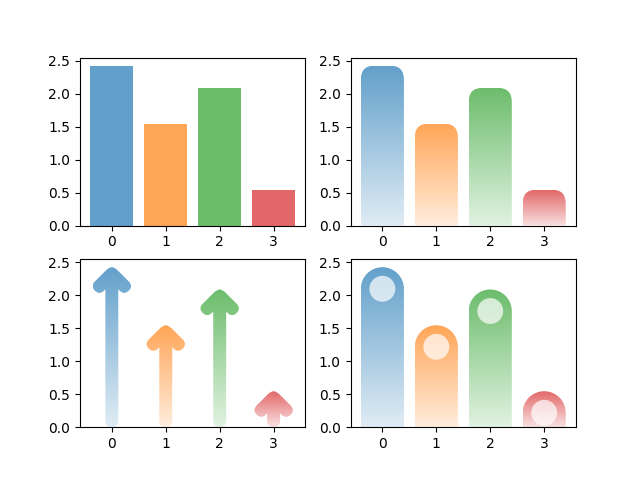
import mpl_visual_context.patheffects as pe
import numpy as np
import matplotlib.pyplot as plt

# Fixing random state for reproducibility
np.random.seed(19680)

# Example data
n = 4
x_pos = np.arange(n)
performance = 5 * np.random.rand(n)
colors = [f"C{i}" for i in range(n)]

fig, axs = plt.subplots(2, 2, num=1, clear=True)

ax = axs.flat[0]
bars = ax.bar(x_pos, performance, align='center', alpha=0.7, color=colors)

ax = axs.flat[1]
bars = ax.bar(x_pos, performance, align='center', alpha=0.7, color=colors)
patheffects = [pe.RoundCorner(10, i_selector=lambda i: i in [2, 3]) | pe.AlphaGradient("0.2 ^ 1.")]
for p in bars:
    p.set_path_effects(patheffects)

from mpl_pe_fancy_bar import BarToArrow

ax = axs.flat[2]
bars = ax.bar(x_pos, performance, align='center', alpha=0.7, color=colors)
patheffects = [BarToArrow() | pe.AlphaGradient("0.2 ^ 1.")]
for p in bars:
    p.set_path_effects(patheffects)

from mpl_pe_fancy_bar import BarTransformBase, BarToRoundBar
from matplotlib.path import Path

class CustomBar(BarTransformBase):
    def __init__(self, radius=0.3,
                 orientation="vertical"):
        super().__init__(orientation=orientation)
        self._radius = radius

    def _get_surface(self, h):
        circle = Path.circle(center=(0., h-0.5), radius=0.3)
        return circle

ax = axs.flat[3]
bars = ax.bar(x_pos, performance, align='center', alpha=0.7, color=colors)
patheffects = [
    BarToRoundBar() | pe.AlphaGradient("0.2 ^ 1."),
    pe.FillColor("w") | CustomBar(),
]
for p in bars:
    p.set_path_effects(patheffects)

plt.show()
Total running time of the script: (0 minutes 0.235 seconds)